
Winbox Download

Download Winbox APK for Android: Step-by-Step Guide
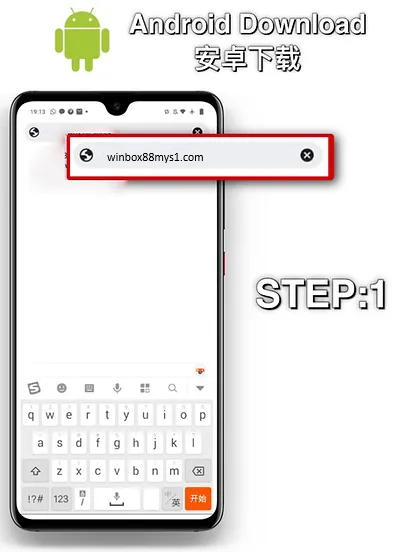
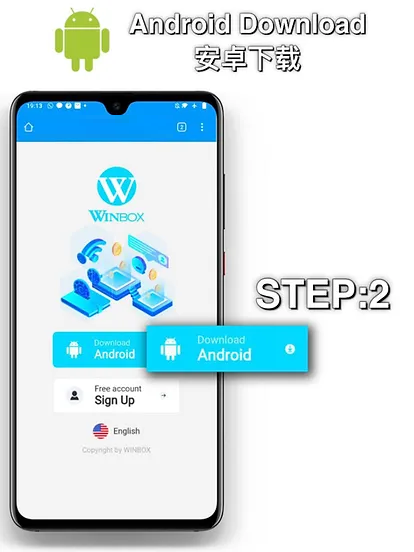
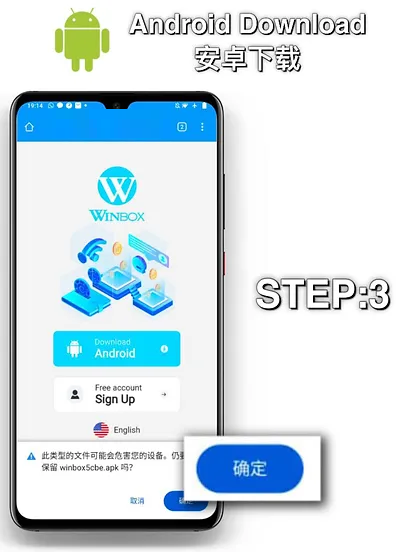
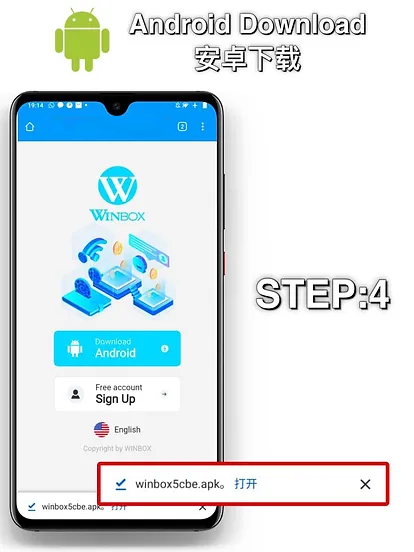
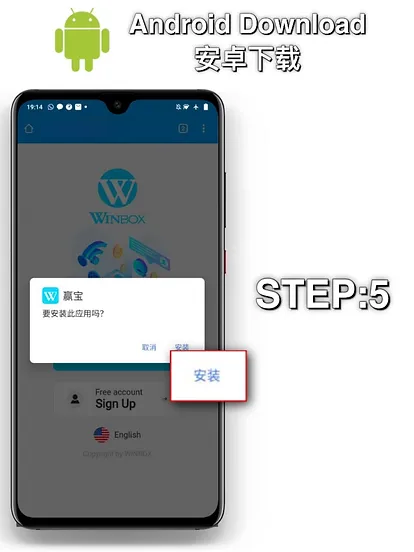
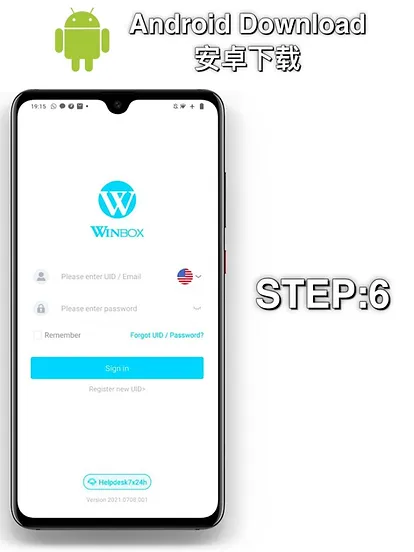
Android users can install Winbox using the official APK download. The process only takes a few steps, but make sure you download the file from the official Winbox website to avoid unofficial or modified versions.
Step 1: Open the Official Winbox Download Page
Visit the official Winbox download page from your Android phone or tablet. Select the Android download option to start downloading the latest available APK.
Step 2: Download the APK File
Tap the “Download Android” button and wait for the APK file to finish downloading.
Before opening the file, make sure it was downloaded from the official Winbox website.
Step 3: Open the Downloaded APK and Log In
Launch the app and perform Winbox h5 login. If you do not have an account yet, complete the registration process before logging in.
Important: Only download the Winbox APK from the official source. Avoid APK files shared through unknown websites, third-party download pages or unfamiliar links.
Download Winbox App for iOS: Step-by-Step Guide
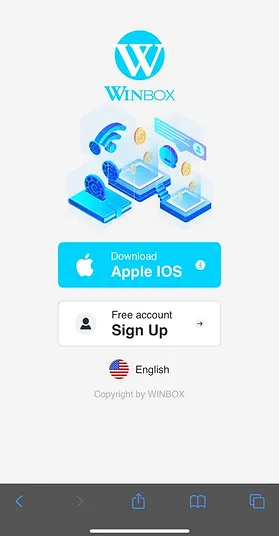
Winbox also supports iPhone and iPad users. If you are using an Apple device, follow the official iOS installation instructions provided.
Step 1: Open the Winbox Download Page
Use your iPhone or iPad to visit the official Winbox download page.
Step 2: Install the iOS Configuration Profile
Choose “Download iOS”, follow the instructions to begin the installation process.
Step 3: Complete the Trust Setting and Open Winbox
After installing the profile, go to Settings → General → Device Management and select the Winbox profile to complete the required trust settings. Once done, return to your home screen and open the Winbox app.
Tip: If the installation does not complete, check your internet connection, available device storage and iOS compatibility before trying again.

Winbox APK Download


Size: 42.6 MB
Category: E-Wallet, Casino & Gaming
Version: 2026.0821.001
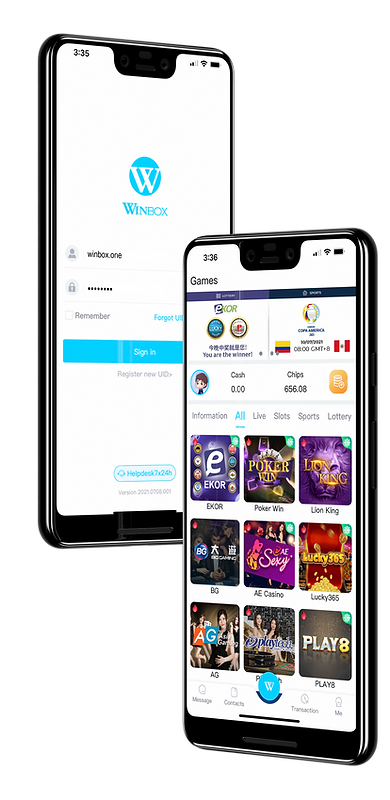
Create Your Winbox Account
Register with Winbox and get your account ready to access the platform on your supported device
Download Instructions and Installation Details
Choose the installation method that matches your device. The table below gives you a quick overview of the available download options, file sizes and estimated installation times.
System | Installation Method | Approx. Download Size | Estimated Installation Time |
Android | Download APK file from the website | ~38 MB | 1–2 minutes |
iOS | Mobile configuration via browser | ~5 MB config | Around 1 minute |
Check Your Device Compatibility
Before downloading the app, make sure your device can support the current Winbox mobile application.
Device Type | Supported OS | RAM | Storage Needed |
Android Phones | Android 6.0 or later | 2 GB or more | 100 MB |
iPhone / iPad | iOS 11.0 or later | 2 GB or more | 80 MB |
Android Tablets | Android 6.0 or later | 2 GB or more | 100 MB |
The app supports all major brands such as Xiaomi, Samsung, Huawei, Oppo, Vivo, and Apple iPhone/iPad.
Before installing, please check that:
- Your device has a stable internet connection.
- You have enough available storage for the app.
- Your operating system meets the requirements of the current app version.
- You are downloading the latest version from the official Winbox source.
- You are using a device that is compatible with the applicable Android or iOS installation process.
How to Log In After Installation
Once Winbox has been installed, you can access your account directly from the app.
For Existing Users
- Open the Winbox app on your phone or tablet.
- Select the Winbox Login option.
- Enter your registered username and password.
- Check that your login details are correct.
- Select Login to access your account.
If you cannot remember your password, use the available password recovery option on the login screen.
For New Users
If you have not registered a Winbox account, register Winbox first. You will need to provide the information requested during registration and use accurate account details.
Winbox’s terms state that users must be at least 18 years old and meet the applicable legal gambling age in their country of residence.
Why Install the Winbox App?
The Winbox mobile app gives you another way to access your account without relying on a desktop computer. Once installed, you can open the app directly from your phone or tablet and access supported gaming categories from a mobile interface.
Some of the main reasons users may prefer the app include:
- Direct access: Open Winbox directly from your device instead of entering the website address each time.
- Mobile-friendly experience: Browse supported games and account features through a mobile interface.
- Convenient account access: Check your account and manage supported functions from your phone.
- Multiple gaming categories: Access available casino, sports, lottery and other supported categories from one platform.
- Suitable for smartphones and tablets: Use Winbox on supported Android and iOS mobile devices.
The exact games and features available through the app can change, so check the current platform listings after logging in.
Games Available on the Mobile App
Winbox brings several gaming categories together on one platform. The available selection can vary by provider and current platform availability.
Live Casino
The live casino section includes popular table games such as:
- Baccarat
- Roulette
- Blackjack
- Sic Bo
- Poker variants
The available tables, providers and game variations may change over time.
Online Slots
The slot section includes different game styles, from classic slot formats to modern video slots with different themes, paylines and bonus features. Winbox also works with various gaming providers, with available titles depending on the current game library.
Sports Betting
The mobile platform also provides access to supported sports betting categories. Depending on the current schedule and provider availability, users may find sports such as:
- Football
- Basketball
- Tennis
- Badminton
- Esports
- Horse racing
Sports, events, markets and odds can change, so check the sportsbook for the latest available options before placing a bet.
4D, 5D and 6D Lottery
Winbox also provides number-based gaming options, including 4D, 5D and 6D lottery categories.
- 4D: Four-digit combinations from 0000 to 9999
- 5D: Five-digit combinations from 00000 to 99999
- 6D: Six-digit combinations from 000000 to 999999
Different games may have different prize categories and matching requirements. Check the relevant game information for the current draw and prize details.
Horse Racing
Horse racing is also available through a dedicated racing platform listed by Winbox. Users can check available races, race information and betting options according to the current racing schedule.
Enjoy These Key Features After Download
Once you have installed the Winbox app and logged in, you can use the available mobile features from your device.
Browse Different Gaming Categories
Move between available casino games, slots, sports betting, lottery and other supported categories without needing to use separate platforms.
Access Your Account on Mobile
The app allows you to access your Winbox account from a supported smartphone or tablet and manage the functions available to your account.
Explore Games From Different Providers
Winbox features titles from various gaming providers. The current site lists providers such as Lucky 365, AE Sexy, Lion King and 918Kiss, although the available providers and games may change.
Manage Your Account
Depending on the features currently available to your account, you can use the mobile platform to access account-related functions without switching to a desktop computer.
Access Promotions
Available promotions and bonuses can also be viewed through the platform. Always check the eligibility requirements and applicable terms before participating.
What Makes the Winbox App a Better Choice Than the Web Version?
Both the mobile app and website provide access to Winbox, but installing the app can make mobile access more convenient.
Feature | Winbox App | Web Version |
Access from smartphone | ✓ | ✓ |
Access from tablet | ✓ | ✓ |
Requires installation | ✓ | No |
Open directly from your device | ✓ | No |
Mobile-friendly experience | ✓ | No |
Access to supported games | ✓ | ✓ |
Account access | ✓ | ✓ |
Updates required | App updates may be required | No app installation required |
The main difference is how you access the platform. With the app installed, you can open Winbox directly from your device rather than returning to a mobile browser each time.
If you prefer not to install an application, the web version remains another way to access supported Winbox services.
Winbox App Updates Guide
Keeping the app updated helps ensure that you are using the latest available version. Updates may include changes to the app, improvements, bug fixes or adjustments required for continued compatibility.
Always download from the Winboxmy site.
How to Know When an Update Is Available
You may need to update the app when:
- The app displays an update notification.
- You are asked to install a newer version before continuing.
- Certain features stop working as expected.
- The current version is no longer supported.
- A newer version is listed on the official Winbox download page.
If you are unsure whether you are using the latest version, check the official download page for the current release.
How to Update Winbox App on Android
If you are using the Android APK version:
- Open the official Winbox download page.
- Check whether a newer APK version is available.
- Download the latest official APK.
- Open the downloaded file.
- Follow the installation instructions shown on your device.
- Launch Winbox after the update is complete.
- Log in with your existing account.
Only use the official Winbox source when downloading an updated APK.
How to Update Winbox App on iOS
For iPhone or iPad:
- Open the official Winbox download page.
- Check the current iOS app version or installation option.
- Follow the latest installation or update instructions shown.
- Complete any required steps on your device.
- Open Winbox after the update.
- Log in using your existing account.
The exact update process may depend on the current iOS installation method and your device settings.
What Happens If I Use an Older Version?
An older version may continue to work for some time, but it may not provide the latest improvements or remain compatible with the current platform.
If the app asks you to update, or if you encounter problems after a platform update, install the latest version available from the official Winbox download page.
Common Download & Installation Problems: Winbox Download Troubleshooting
Having trouble downloading or installing the app? Start with the issue that matches what you are experiencing.
The Winbox APK Won’t Download
Check your internet connection and try the download again. If the problem continues, make sure you are accessing the official Winbox download page and have enough storage available on your device.
The APK Downloaded but Won’t Install
Check that:
- The download completed successfully.
- Your Android device is compatible with the current app version.
- Your device has enough available storage.
- Your device allows the required installation process.
- You downloaded the APK from the official Winbox source.
If the APK appears incomplete or corrupted, download the latest version again from the official page.
The App Won’t Open
Try the following:
- Close the app completely.
- Check your internet connection.
- Restart your device.
- Check whether an updated version is available.
- Reinstall the latest official version if necessary.
The App Keeps Crashing
First, make sure you are using the latest available version. You can also restart your device and check whether sufficient storage is available.
If the problem started after an update, reinstalling the latest official version may help.
The iOS Installation Is Not Working
Check your internet connection, available storage and device compatibility. Then return to the official Winbox download page and follow the latest iOS installation instructions again.
I Cannot Log In After Installing the App
Make sure you are entering the correct username and password. If you have forgotten your password, use the available recovery option.
If your login details are correct but you still cannot access your account, contact Winbox support for account assistance.
I Cannot Find the Downloaded APK
On most Android devices, downloaded files can be found in the Downloads folder. You can also check your browser’s recent downloads to locate the APK.
The App Says I Need to Update
This usually means your current version may no longer be supported or a newer version is required. Return to the official Winbox download page and install the latest available version.
I Accidentally Downloaded the Wrong File
Do not install files obtained from unknown websites. Instead, remove the file and return to the official Winbox download page to obtain the correct version.
Still Having a Problem Downloading the Winbox App?
If you have followed the download and troubleshooting steps above but still cannot install or access the Winbox app, contact Winbox customer support.
Support can assist with issues such as:
- Download and installation problems
- Login difficulties
- Account access
- App-related technical issues
- Registration questions
- Deposit and withdrawal issues
- Game access
Winbox’s existing site provides 24/7 live chat support for account, payment, game and technical enquiries.
Before contacting support, it helps to provide details such as your device type, operating system, the app version you are using and a description or screenshot of the error. This can make it easier to identify the problem.
Frequently Asked Questions (FAQs)
Is the Winbox88 APK safe to install?
Yes. Download the Winbox88 APK only from the official Winbox88 website to reduce the risk of installing an altered or unsafe file. Avoid APKs shared through third-party websites or unfamiliar links.
Can I install Winbox88 on multiple devices?
Yes. You can install Winbox88 on more than one compatible device. However, access across multiple devices may be subject to account security checks and platform policies.
Can I use my existing Winbox88 account on the app?
Yes. Your Winbox88 account can be used on both the website and mobile app. Simply sign in with your existing username and password after installing the app.
How often does the Winbox88 app receive updates?
Winbox88 may release app updates when new versions, improvements or compatibility changes are available. Check the official Winbox88 download page regularly to make sure you are using the latest version.
Is Winbox88 available on Google Play or the Apple App Store?
Winbox88 provides its mobile installation options through its official website rather than relying on the Google Play Store or Apple App Store. Visit the official download page for the latest Android and iOS installation instructions.
Can I use Winbox88 on a PC?
Yes. You can access Winbox88 through a compatible web browser on your PC without installing separate desktop software. For smartphones and tablets, you can install the Winbox88 mobile app for direct access.